
Welcome to the 5G PatentEdge dashboard user manual!
5G PatentEdge is a global database of self-declared standards-essential patents (SEPs) declared to be “essential” to 5G cellular network technology. 5G standards are maintained by 3GPP, an international standards consortioum which develops protocols for mobile telephony. SEP declarations are made by companies directly to the European Telecommunication Standards Institute (ETSI), which maintains a database of all SEP declarations. In many cases, the SEP declarations are submitted with reference to specific 3GPP 5G standards and versions.
With 5G PatentEdge, IP Checkups aims to enable users to more easily extract useful insights from the 5G SEP data. Here is a brief tour:
The Dashboard
The interactive 5G PatentEdge dashboard allows you to filter the 5G PatentEdge SEP declarations by type, date, company, and individual standards.
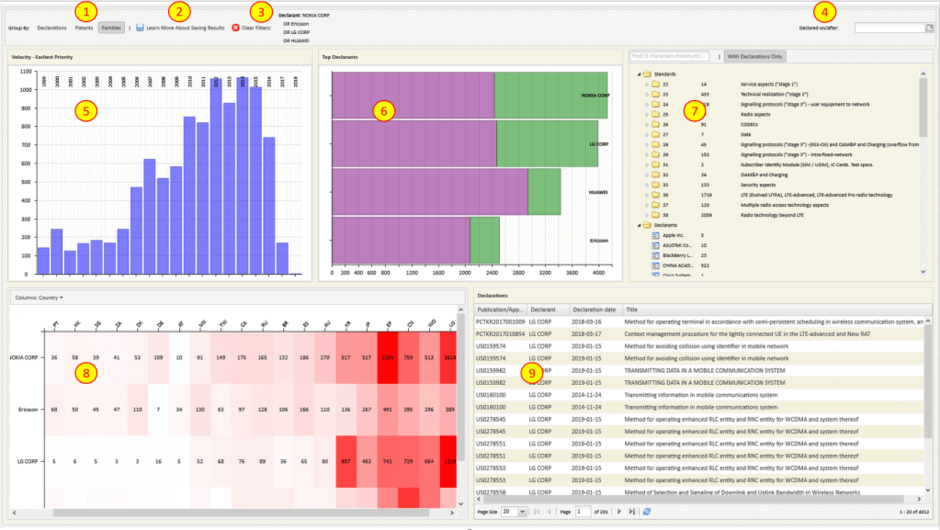
- Group By: This global option allows you to display results by Declarations, Patents, or Families.
- Declarations: Data displayed by ETSI declarations (as normalized by IP Checkups, more info here).
- Patents: Declarations filtered to display patents matched with European Patent Office (EPO) records and imported to the 5G PatentEdge database.
- Families: Patents grouped by INPADOC Patent Families.
- Save/Export: Enabled for PatentEdge/PatentCAM subscribers. Export normalized patent records to a spreadsheet or save to a user collection in PatentCAM for further analysis.
- Filters: Displays the currently applied filter query per your selections in the dashboard. Click “Clear Filters” to remove all current filters.
- Declared on/after: Filters the records to display those declared on/after the chosen date.
- Velocity Chart: Displays the annual total of SEP declarations/patents/families displayed per the chosen option. Results are displayed as follows:
- When Declarations is selected, declaration year is displayed.
- When Patents is selected, application year is displayed.
- When Families is selected, earliest priority year is displayed.
- Top Declarants: Displays totals for the top-declaring companies, per your chosen filter options.
- Standards/Projects/Declarants Collection Tree: Use this folder-based hierarchy to browse 3GPP 5G Standards, 5G ETSI Projects, and Declaring Companies.
- Search the collections using the text search field.
- Choose ‘With Patents Only’ to only display items containing data.
- Select items in the tree to filter the data (Ctrl/Cmd-click to multi-select).
- Hover to view full titles of standards or projects.
- Heat Map: This chart shows the distribution of Declarant companies (rows) across Standards Groups, Countries, and Year (Use the top left ‘Group by’ menu to choose which).
- Standard Groups: Displays company activity across the two-digit 3GPP standards.
- Countries: Displays company activity across international patent offices.
- Year: Displays company activity per year
- Results/Output: Table of filtered and normalized self-declared SEP declarations.
Need more information on the 5G PatentEdge Dashboard or 5G PatentEdge Pro? A custom PatentCAM database or Consulting Services, ? Contact us, and we’d be happy to help.